
Cover Fire: Offline Shooting
Viva Games StudiosAction
4.650.48K Reviews
- Version
- 1.33.11
- Installs
- 100.00M
- Age Rating
- Teen
Screenshots
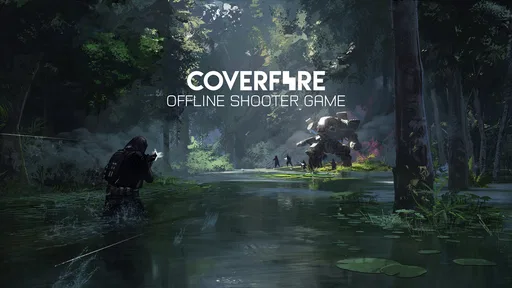
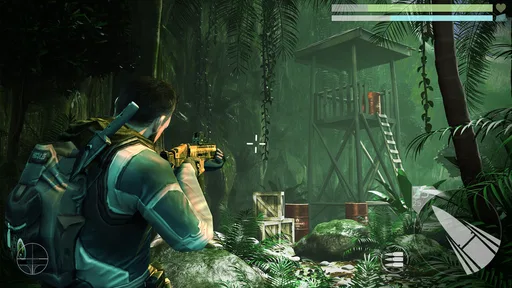

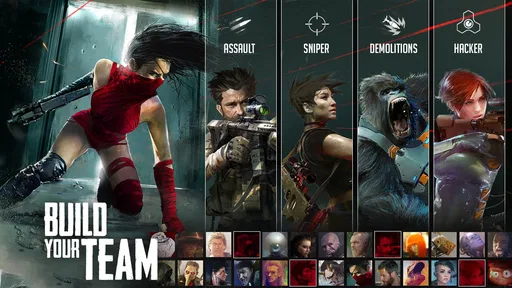
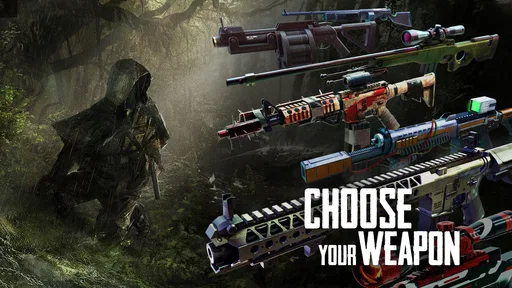
Our Review of Cover Fire: Offline Shooting
 Analysis by Appyee
When I’m choosing a mobile shooter, I care about more than the action: I want to know whether I can follow what’s happening on a small screen, control it comfortably, and play in the situations I actually have time for. Cover Fire: Offline Shooting is an action game from Viva Games Studios that puts short, mission-based firefights at the center of the experience. I find it easiest to enjoy when I treat each encounter as a focused burst of play rather than expecting the open-ended pace of a large console-style shooter.
Reading the action and finding your way around
My first impression is that the visual presentation aims for immediacy: enemies, cover, and the current firefight are meant to hold your attention, while the tutorial introduces the basic actions before the missions ask more of you. That gradual start is useful if you do not play shooters often. It gives you a chance to learn the rhythm before you have to make quick decisions under pressure.
The interface is built around direct actions such as aiming and firing, rather than a large set of commands that needs memorizing. That can make the first steps approachable, but it does not automatically make every encounter easy to read. During a busy firefight, visual effects and moving targets compete for attention. I recommend pausing between missions to check the objective and any available squad or equipment choices instead of rushing straight into the next encounter. A moment of preparation can make the action feel clearer.
The game’s mission structure also gives it a different rhythm from shooters that drop you into a broad map and leave you to decide where to go. Here, the immediate task matters: you focus on the current objective, use cover, and respond to what is in front of you. I like that when I have limited time, though players who enjoy exploring a world at their own pace may find the guided structure restrictive.
Controls, pace, and sensory comfort
The simple swipe-to-aim and tap-to-shoot approach is easy to understand, but aiming is still a repeated fine-motor task. If your hands tire quickly or precise touch input is uncomfortable, the game may become demanding during longer sessions. I would try a short mission first and pay attention to how the controls feel on your device before settling in for a long run. Familiarity helps, but it cannot remove the need to aim accurately.
The cover system adds a useful pause to the firefight. Ducking behind an obstacle gives you a chance to reload and think about your next move, so success is not only a matter of tapping as fast as possible. I find that this makes the game more manageable when I deliberately use cover rather than staying exposed and trying to react to everything at once. Even so, the action is still built around combat, gunfire, and urgent encounters. Anyone who is sensitive to intense visual or audio cues may prefer to keep sessions brief or choose a calmer kind of game.
Sound contributes to the sense of urgency, with gunfire and music accompanying the action. That can make missions feel lively, but it also means the experience may be less comfortable in a quiet shared space or for someone who prefers subdued sound. Playing with the audio lowered is a practical option when the setting calls for it; the trade-off is that some of the atmosphere loses impact. The visuals and sound work together to create excitement, not a quiet or low-stimulation experience.
When offline play fits real life
Offline play is the feature I value most in everyday use. I can see this working well on a commute with unreliable reception, during a flight, or while waiting somewhere that has no convenient Wi-Fi. It also makes the game a useful choice when I want an action game without needing to plan my play around a stable connection. I would still make sure the game is ready on the device before relying on it for a trip, rather than assuming every setup step can be done without a connection.
A realistic session might be a few missions during a lunch break: start with a clear objective, play while you have a quiet window, then stop when you need to return to work. Mission-based play suits that routine better than a match that expects you to stay online and available until it ends. The benefit is flexibility; the limitation is that a phone can be awkward to hold and control when you are standing on a crowded train or walking. Offline does not mean hands-free, and I would not recommend playing in situations where attention needs to stay on your surroundings.
For a quick decision, I would recommend it to players who want a directed action game, enjoy aiming and taking cover, and appreciate being able to play without dependable internet. I would steer someone toward a slower tactical game if careful planning matters more than rapid firefights, or toward a multiplayer shooter if competing with other people is the main attraction. It is also a poor fit for anyone looking for a nonviolent game or an experience designed around exploration rather than combat.
First Impressions
Launching Cover Fire for the first time, I was immediately drawn in by its crisp graphics. The visuals are quite impressive for a mobile game, with detailed environments that make you feel like you're right in the thick of the action. The game kicks off with a tutorial that’s as engaging as it is informative, which I appreciated as it gently eased me into the mechanics without overwhelming me.
Gameplay Mechanics
The core of Cover Fire is its thrilling, mission-based gameplay. You're tasked with leading a squad of heroes through various challenges, each more intense than the last. The controls are intuitive—swipe to aim, tap to shoot—which makes it easy to jump in and start playing, even if you're not a seasoned gamer.
Each mission presents a unique objective, from sniping enemies to orchestrating full-scale assaults. The game also features a cover system that adds a strategic layer, allowing you to duck behind obstacles, reload, and plan your next move. It’s not just about shooting; it's about outsmarting your opponents. Strategy and precision are key here.
Character and Weapon Customization
One of my favorite aspects of Cover Fire is the customization options. You can upgrade your squad members and equip them with a variety of weapons, each bringing a different tactical advantage to the table. There's a satisfying progression system in place that keeps you hooked, always striving to improve your arsenal and skills.
The game does an excellent job of rewarding players for their efforts. Completing missions earns you in-game currency, which can be used to unlock new weapons and power-ups. It's an addictive loop that keeps you coming back for more.
Offline Mode
Now, this is a game-changer—literally. The ability to play Cover Fire offline means you can enjoy the action anywhere, anytime, without worrying about spotty Wi-Fi. Whether you’re on a long flight or just out of data, the fun never stops. This feature alone makes it a standout in the mobile gaming landscape.
Graphics and Sound
The graphics in Cover Fire are top-notch, creating a visually immersive experience. The environments are varied and detailed, from lush jungles to war-torn cities, each with its own unique challenges. The sound design complements the visuals beautifully, with realistic gunfire and an adrenaline-pumping soundtrack that keeps your heart racing.
What progression asks of you
As I play through missions, I find that upgrades give each return visit a small practical purpose: earning currency is not only a score to admire, but a way to improve the tools available for later challenges. I would avoid spending every reward immediately. When a mission feels difficult, first consider whether a weapon or squad upgrade would address the problem, rather than repeating the same approach and hoping for a better outcome. This makes progression feel more deliberate, even though the basic loop remains combat, rewards, and further missions.
That loop is also where the game’s “addictive” quality can cut both ways. A quick mission can easily turn into several, especially when I want to see what the next objective brings. If I need a game that is easy to put down after a strict time limit, I find it helps to decide in advance how long I intend to play. The missions are convenient for short breaks, but the steady sense of progression can make stopping less automatic.
Free to start, with spending to consider
The game is free to download, and optional in-app purchases range from $0.99 to $84.99 per item. I would start by playing without spending and see whether the mission pace and progression suit me. Purchases may appeal to someone who wants to accelerate access to items, but I would treat them as optional rather than necessary before I have experienced the game’s normal rhythm. The important practical point is to keep an eye on spending if a younger player uses the device.
Its Teen age rating is another useful part of deciding who should play. This is a combat-focused shooter, so it is not a good choice for a child who is uncomfortable with weapon-based action, nor for a household looking for a gentle game to share across ages. The rating and the game’s tone matter more than the fact that its controls are easy to learn: accessibility at the control level does not make the subject matter suitable for everyone.
How it compares with other mobile shooters
Compared with a competitive online shooter, this game’s strongest distinction is that I can focus on structured missions without relying on a live match or a constant connection. That makes it more practical for travel and short solo sessions, but it does not offer the same appeal as testing my skill against other players. Compared with a slower, planning-heavy tactical game, its action feels more immediate and its touch controls are easier to pick up, while the quick pace gives me less room to consider every move.
That middle ground is the main reason I would choose it: I get more direction than an open-ended action game and less commitment than an online match. It is not my pick when I want a deep simulation, a social experience, or a story-led adventure. If what I want is a mobile shooter that lets me tackle a defined objective whenever I have a spare moment, its format makes more sense than those alternatives.
Device fit and practical expectations
The game requires Android 8.0 or later, and its current version is 1.33.11. Before installing, I would check that my device meets that requirement and has enough room for a game with detailed 3D environments. I would also try it on the screen I expect to use most: the visibility of targets and the comfort of touch aiming can feel different on a smaller phone than on a larger display. That quick check is more useful than assuming that a shooter will feel identical across devices.
Cover Fire has a 4.6 average from around 2.6 million ratings, with about 50,000 written reviews and over 100 million installs. Those figures suggest that it has reached a broad audience, but they do not tell me whether its combat style will suit my hands, attention, or tolerance for intense sound. I would use them as context, then decide based on a short hands-on session rather than popularity alone.
Where the experience still asks for adjustment
The game is approachable, but I would not call it effortless. Touch aiming requires attention, the pace can become intense, and the combat presentation may be uncomfortable for people who prefer quiet or low-stimulation play. The mission structure is clear, yet it can feel repetitive to someone who wants broad freedom or a different kind of objective every time. Those are not small details for the right player; they shape whether the game feels convenient or tiring.
For a more comfortable session, I would play seated, keep the phone steady, and take a break when my aim starts to feel rushed. If sound is a concern, lowering it can make the game easier to use in shared spaces, though it also reduces some of the atmosphere. These are simple adjustments, not a substitute for features the game does not establish here, so anyone who needs a specific accessibility option should test the controls and presentation personally before committing to a long session.
Final Thoughts
Overall, Cover Fire: Offline Shooting is a must-try for anyone who loves action-packed games with a tactical edge. It brings together stunning graphics, smooth gameplay, and a variety of missions that keep you engaged for hours. Plus, the offline mode is a blessing for gamers on the go. If you’re looking for a new mobile game to dive into, give this one a shot—you won’t regret it!
Ready to jump into the action? Download Cover Fire and start your mission today!
Verdict
Strengths of Cover Fire: Offline Shooting
- Stunning graphics enhance gameplay immersion.
- Wide range of weapons to customize loadout.
- Offline mode for uninterrupted play.
- Engaging story-driven campaign missions.
- Frequent updates with new content.
Limitations of Cover Fire: Offline Shooting
- Requires significant storage space.
- Can be demanding on older devices.
- In-app purchases for faster progression.
- Energy system limits playtime sessions.
- Occasional ads disrupt gameplay.
Similar Picks in This Category
View All
Temple Run 2: Endless Escape
Imangi Studios4.1

PUBG MOBILE
Level Infinite4.3

Free Fire: 9th Anniversary
GARENA INTERNATIONAL I4.4

Talking Tom: Hero Dash Run
Outfit7 Limited4.3

slither.io
Lowtech Studios3.9

Sniper 3D:Gun Shooting Games
Wildlife Studios4.6
Frequently Asked Questions
What is Cover Fire: Offline Shooting about?
Cover Fire: Offline Shooting is an action-packed shooter game where players engage in immersive missions against various enemies. With an array of weapons and characters, players can strategize their approach to complete missions. The game is designed to work offline, ensuring you can play anytime without needing an internet connection.
Can Cover Fire: Offline Shooting be played without an internet connection?
Yes, one of the key features of Cover Fire is its ability to be played offline. This makes it ideal for users who may not always have access to the internet. All game modes, including story missions, can be enjoyed without needing to connect online.
What are the system requirements for Cover Fire on Android and iOS?
For Android devices, Cover Fire requires at least Android 6.0 and 1 GB of RAM for optimal performance. On iOS, it requires iOS 10.0 or later. It’s compatible with iPhone, iPad, and iPod touch. Ensure your device meets these specifications for the best gameplay experience.
Are there in-app purchases in Cover Fire: Offline Shooting?
Yes, while Cover Fire can be played for free, it does offer in-app purchases. These purchases can enhance gameplay by providing access to special weapons, characters, and upgrades. However, all content can be accessed through regular gameplay, making purchases optional.
How does Cover Fire compare to other shooting games?
Cover Fire stands out due to its offline capabilities, high-quality graphics, and engaging storyline. Unlike many other shooting games, it does not require a constant internet connection, making it more accessible. Its variety of missions and strategic gameplay also provide a richer experience compared to some of its competitors.
Play our best games!


